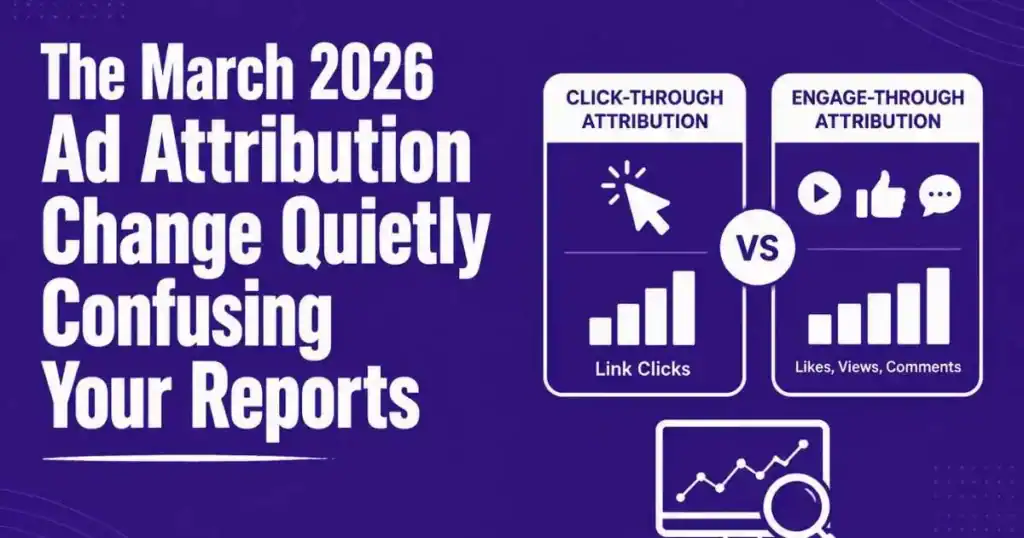
Starting March 2026, Meta changed how it counts a sale. If someone clicked your ad and bought, that still counts as before. But if someone liked your ad, watched part of your video, or expanded it, and bought later, that sale no longer sits in the same column it used to.
This single change is why a lot of advertisers are seeing their numbers shift for no clear reason. Nothing about their ads changed. Nothing about their targeting changed. Only the way Meta reports the sale changed, and that’s called ad attribution, the method a platform uses to decide which action gets credit for a sale.
Understanding ad attribution matters more than most beginners realize, because it directly shapes how you judge whether a campaign is actually working. Get this wrong, and you could pause a perfectly good campaign simply because you misread where your sales are now being counted.
Let’s break down what actually happened, and what it means for how you should read your own reports from now on.
What Changed, in Simple Words
Before this update, Meta grouped most conversions together under one main column called click-through attribution. If your ad played a role in a sale, whether someone clicked it directly or just interacted with it in some other way, it mostly showed up in the same place.
Now, Meta splits this into two separate columns.
Click-through attribution now counts only sales where someone actually clicked a link in your ad.
Engage-through attribution is a new column that catches everything else. This includes people who liked your ad, commented, shared it, or watched a meaningful chunk of your video, and then bought later without clicking a link at all.
If you’re only used to checking one number, this split can make your results look like they dropped, even if your actual sales stayed exactly the same.
Three Things This Actually Affects
1. Your reported numbers. Some of the sales that used to sit inside your main column have now moved into engage-through. Your click-through number alone may look smaller, even with identical performance underneath it.
2. Your decision-making. If you’re judging a campaign based only on click-through numbers now, you might pause an ad that’s actually still working well, simply because you’re not looking at the full picture anymore.
3. Your video and engagement-heavy ads specifically. Ads that rely more on video views or interactions, rather than direct clicks, are more likely to show a visible shift, since more of their conversions now land in the newer engage-through column.
Why Meta Made This Change
Meta’s reasoning is that a click and a video-watch aren’t the same kind of action, and lumping them together made it harder for advertisers to understand what was actually driving results. Separating them gives a clearer picture of exactly how people are engaging before they buy.
This makes sense in theory. The tricky part is simply knowing this change happened, so you don’t misread your own numbers because of it.
What This Means for You
If your click-through numbers look lower recently, don’t assume your campaign broke. Check your total number, click-through plus engage-through combined, before making any real decisions.
If you run mostly static image ads with a strong call-to-action link, this change probably affects you less. If you run video-heavy or story-style ads, expect a bigger visible shift, and make sure you’re reading both columns, not just one, going forward.
A simple habit to build starting now: whenever you review performance, glance at both attribution columns together, not just the one you’re used to checking. This one habit alone prevents most of the confusion this change is currently causing.
A Simple Example
Say your ad drove 100 total sales last month. Under the old system, all 100 may have shown up in one column. Under the new system, maybe 70 show up as click-through, and 30 now sit inside engage-through, because those 30 people interacted with your ad in some way before buying, without clicking a direct link.
Your total sales haven’t changed. Only where they’re counted has changed. If you only check the click-through column now, you’d think your campaign dropped by 30%, when really, nothing about your actual performance changed at all.
Why Ad Attribution Matters Before You Scale
Many advertisers increase their budget as soon as they see strong results. However, making scaling decisions without understanding ad attribution can lead to costly mistakes.
For example, if you only review click-through conversions after the March 2026 update, you might believe your campaign is losing momentum. In reality, some of those conversions may simply be recorded under engage-through attribution instead.
Before increasing or decreasing your ad spend, review both attribution columns together. Understanding ad attribution helps you make decisions based on complete data rather than incomplete reports.
Mistakes to Avoid
Judging performance from one column alone. Always look at your combined numbers before deciding a campaign is underperforming.
Assuming your creative suddenly stopped working. Check the reporting change first before blaming your ad itself.
Ignoring this if you run video ads. This shift affects engagement-heavy formats more directly, so pay closer attention if that’s your main ad style.
Comparing new numbers to old reports without adjusting. A month-over-month comparison from before and after March 2026 needs this split in mind, or it won’t be a fair comparison.
Staying Ahead of Reporting Changes
Platform reporting will keep evolving, and this is simply the latest example of that. The advertisers who stay calm and informed through changes like this are the ones checking both numbers, understanding what moved and why, instead of reacting to a scary-looking drop that isn’t actually real.
Lorem ipsum dolor sit amet, consectetur adipiscing elit. Ut elit tellus, luctus nec ullamcorper mattis, pulvinar dapibus leo.
How to Build Ad Attribution Into Your Weekly Routine
A simple way to stay on top of this going forward is to treat checking your ad attribution columns as part of your regular weekly review, alongside things like cost per result and click rate. It doesn’t need to take long. A quick glance at both columns together, click-through and engage-through, tells you the full story instead of just half of it.
If you manage more than one campaign, it’s worth noting which ad formats lean more heavily on each column. Static image ads with a clear link tend to stay mostly in click-through. Video and story-style ads tend to show more activity in engage-through. Knowing this pattern for your own account makes it much easier to spot when something genuinely changed versus when it’s just this reporting split doing its job.
Over time, checking ad attribution properly becomes second nature, the same way checking your budget or your creative fatigue already has. It’s one more habit that protects you from making decisions based on an incomplete picture.
Your sales didn’t disappear. They just moved into a new column, and now you know exactly where to look.
Want Andromeda Training to break down another topic like this and guide you through it step by step?
Drop a comment below telling us what you’re stuck on, whether it’s reading your reports, spotting a reporting shift, or something else, and if you want us to turn it into a full guide, just comment “Write Now” and we’ll get started on it.
A Simple Weekly Ad Attribution Checklist
To avoid confusion after the reporting update, spend a few minutes reviewing these items every week:
- Compare click-through and engage-through conversions together.
- Look at total conversions before judging campaign performance.
- Review your best-performing ad formats to see which attribution column they rely on most.
- Compare results using the same ad attribution settings each time.
- Record major reporting changes so future comparisons stay accurate.
Following a consistent review process makes ad attribution easier to understand and reduces the chances of making decisions based on incomplete data.
FAQs
1. Why do my click-through conversions look lower after March 2026?
Some conversions are now reported under engage-through instead of click-through because of Meta’s updated ad attribution reporting.
2. Can the ad attribution update make my campaign look worse?
Yes. If you only review click-through results, the new ad attribution model can make performance appear lower even when total conversions remain the same.
3. Should I compare reports from before and after the ad attribution update?
Yes, but compare them carefully. The new ad attribution reporting splits conversions into separate columns, so older and newer reports aren’t directly comparable.
4. Which ad formats are most affected by the ad attribution change?
Video, Reels, and engagement-focused ads are more likely to show changes because the updated ad attribution model credits more engagement-based conversions separately.
5. What is the best way to review reports after the ad attribution update?
Review both click-through and engage-through results together so your ad attribution data reflects the full picture before making campaign decisions.
